What does a true all-in-one EHR actually include?

Thirty-eight connected modules across the clinical record, front desk, revenue cycle, patient growth, and practice platform—described deeply enough to evaluate without a scavenger hunt.

Every module below explains what it does, who uses it, what it replaces, and how it connects.
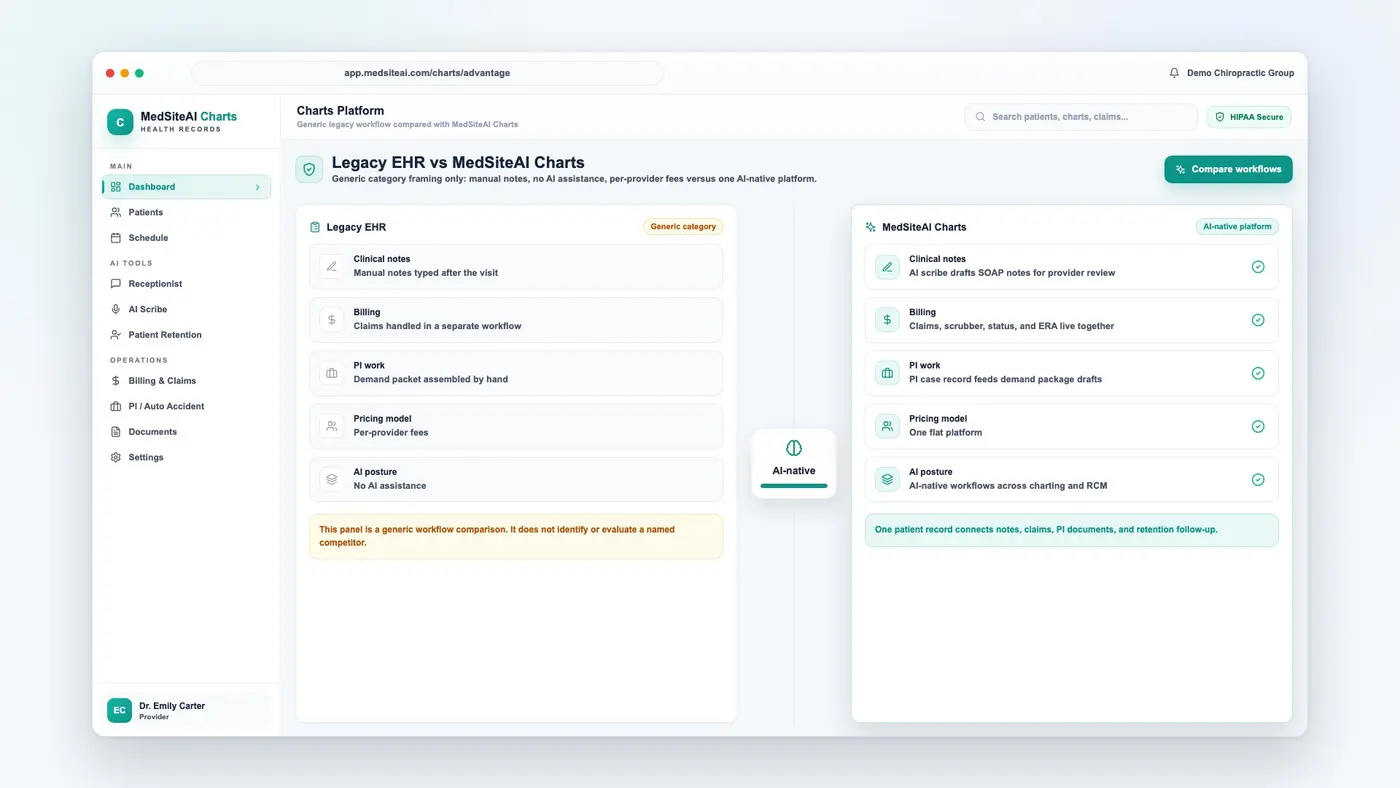
Charts compared with disconnected legacy workflows

Clinical record

The note, coding context, treatment plan, outcomes, and next action stay attached to one patient record.

10 connected modules
01

Dashboard + morning huddle

A role-aware operating view brings today’s schedule, unsigned notes, claims attention, retention risk, and practice signals together.

  • Today and period views
  • Unsigned-note and claim attention queues
  • Practice, retention, and revenue context
Used by
Owners, providers, front desk, and billing leads
Replaces
Whiteboards, morning spreadsheets, and status meetings
Connected to
Schedule, documentation, claims, PI cases, and reporting
02

Patient charts + documentation

SOAP notes, clinical history, diagnoses, documents, signatures, and visit context live in a longitudinal chart.

  • SOAP and general clinical notes
  • Patient history, documents, and signatures
  • Diagnosis and visit-linked records
Used by
Every treating provider and clinical support role
Replaces
Disconnected charting, document storage, and signature tools
Connected to
Scribe, treatment plans, billing, portal, and reporting
03

AI scribe + live coding

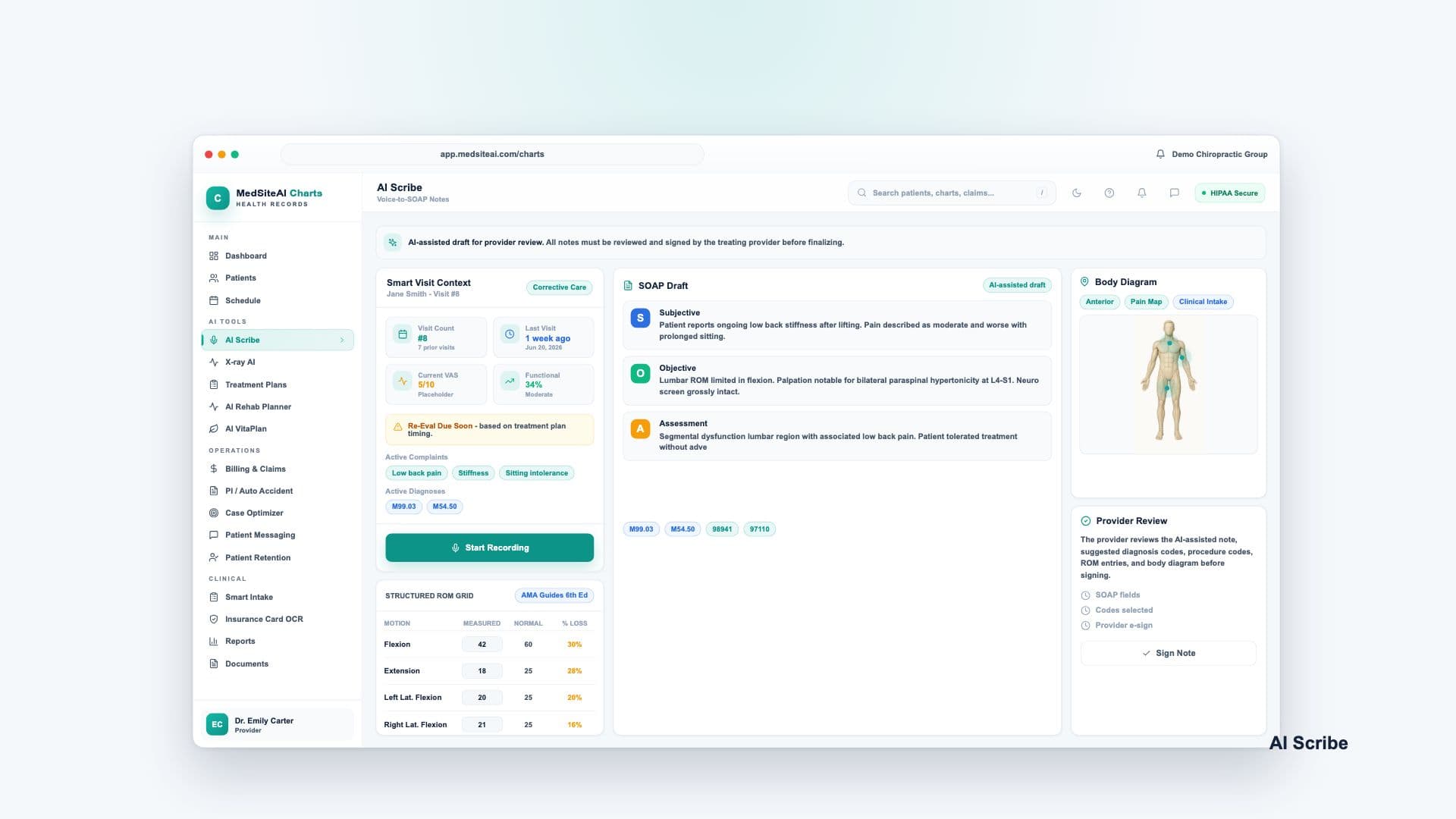
Encounter audio becomes a structured draft with ICD-10 and CPT suggestions for provider review before signature.

  • Ambient recording or post-visit dictation
  • Discipline- and note-type-aware drafts
  • Billing-code suggestions with provider sign-off
Used by
Chiropractors, PTs, rehab clinicians, acupuncturists, and integrative providers
Replaces
Separate transcription, dictation, and coding-reference tools
Connected to
Templates, chart, compliance, superbill, and claims
04

Templates + reusable documentation

Clinical teams standardize evals, daily notes, progress notes, discharge summaries, tables, goals, and custom content.

  • Custom note and evaluation structures
  • Reusable goals, tables, and clinical content
  • Provider review and signature workflow
Used by
Clinical directors and providers
Replaces
Copied documents and locked vendor templates
Connected to
Scribe, treatment plans, compliance, and reporting
05

Insight compliance audit

Documentation is checked for completeness, repetition, coding alignment, and payer risk while final decisions stay with the clinician.

  • Documentation risk flags
  • Coding and modifier alignment checks
  • Audit trails for reviewed notes
Used by
Providers, compliance leads, and billing teams
Replaces
Retrospective chart audits and manual spot checks
Connected to
Scribe, signed notes, payer rules, and claims
06

Enforced visit checkout

Required clinical and operational steps are surfaced before a visit is closed so downstream work starts with a complete record.

  • Required-step checks
  • Charge and follow-up handoff
  • Incomplete-visit attention queue
Used by
Providers and checkout teams
Replaces
End-of-day missing-note and missing-charge cleanup
Connected to
Documentation, charges, follow-up, and patient balance
07

On Deck

Each clinician sees today’s patients, visit number, plan status, and a direct path into the chart.

  • Clinician-scoped patient list
  • Visit and plan-status context
  • Quick-chart access
Used by
Providers and clinical assistants
Replaces
Printed schedules and manual chart prep
Connected to
Schedule, plan of care, chart, and outcomes
08

X-ray AI + DACBAR reports

Imaging workflows support dictated findings and structured DACBAR radiology reports inside the same clinical environment.

  • X-ray dictation mode
  • Structured DACBAR output
  • Chart-linked provider review
Used by
Chiropractic and musculoskeletal practices
Replaces
Separate dictation documents and copied radiology templates
Connected to
Patient chart, scribe, PI documentation, and signatures
09

Treatment plans + outcomes

Goals, visit cadence, outcome measures, progress, and discharge context stay visible across the episode of care.

  • Plan-of-care goals and cadence
  • Outcome measure tracking
  • Progress and discharge context
Used by
Rehab, chiropractic, acupuncture, and integrative teams
Replaces
Standalone outcome forms and plan trackers
Connected to
Scheduling, retention, HEP, surveys, and reporting
10

Telehealth

Virtual-care encounters connect to the same schedule, patient record, documentation, and follow-up workflow.

  • Virtual visit workflow
  • Chart-linked encounter context
  • Connected follow-up
Used by
Clinicians offering remote visits
Replaces
Unlinked meeting tools and duplicate encounter records
Connected to
Schedule, chart, scribe, messaging, and billing

Clinical detail that still hands off cleanly to operations.

Product motion is supplied from the real Charts demonstration library and loads only when this proof enters the viewport.

Charts clinical record and visit workflow

Scheduling + front desk

Phone, web, walk-in, and staff-booked appointments converge on one schedule and one patient record.

7 connected modules
11

Scheduling + kiosk

Day, week, month, and provider views connect online booking, front-desk actions, check-in, and visit status.

  • Multi-provider schedule views
  • Kiosk check-in and intake
  • Arrival, check-in, completion, and no-show states
Used by
Front desk, providers, and practice managers
Replaces
Separate calendar, intake tablet, and check-in software
Connected to
Voice agent, online booking, patient chart, eligibility, and checkout
12

Online booking for any website

Practices can add Charts booking to an existing website or pair it with a MedSite practice website.

  • Works with an existing website
  • Real-time appointment handoff
  • Booking and intake continuity
Used by
Practices keeping their current site and practices consolidating the full stack
Replaces
Third-party booking forms and re-keyed appointment requests
Connected to
Schedule, intake, reminders, CRM, and patient record
13

AI voice receptionist

The AI answers calls and books directly into the Charts schedule, including for practices that keep their current website.

  • Phone answering and appointment booking
  • Direct EHR schedule connection
  • Works alongside any existing website
Used by
Practices losing calls after hours or during busy front-desk periods
Replaces
Voicemail, call-answering services, and manual callback queues
Connected to
Schedule, patient record, CRM, website booking, and messaging
14

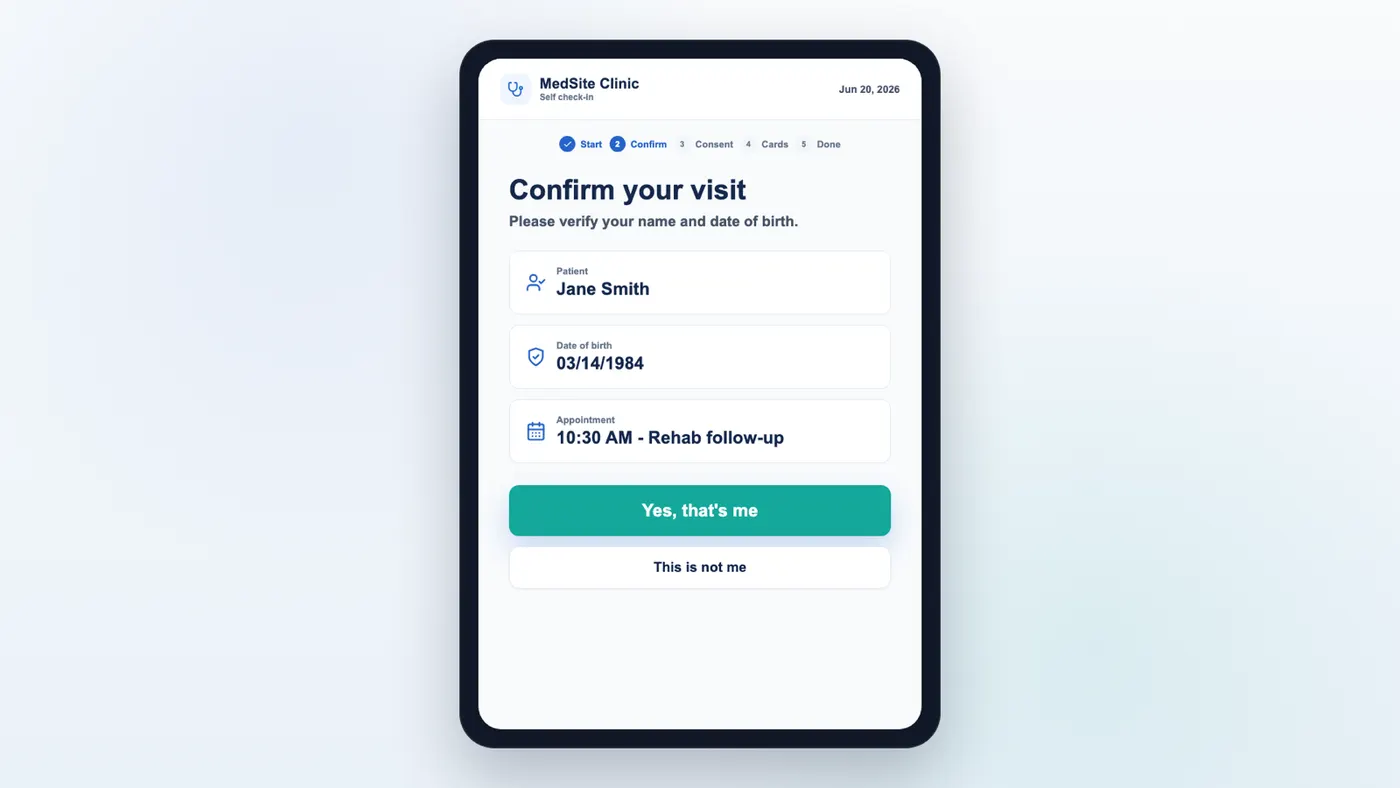
Kiosk intake + pay balance

Patients check in, complete intake, capture insurance, and address an open balance in one arrival flow.

  • Digital intake and consent
  • Insurance-card capture
  • Patient-balance payment step
Used by
Front desk teams and self-check-in practices
Replaces
Paper packets, separate card terminals, and manual data entry
Connected to
Patient record, eligibility, card on file, and visit checkout
15

Automatic waitlist fill

A cancellation can match an eligible waitlist patient and trigger a texted slot offer without a calling marathon.

  • Cancellation-triggered matching
  • SMS slot offers
  • Schedule update when accepted
Used by
Schedulers and retention teams
Replaces
Manual cancellation lists and repeated calls
Connected to
Schedule, messaging, plan cadence, and patient preferences
16

Plan-of-care compliance nudges

Charts detects under-scheduled patients relative to the plan frequency and can prompt them to rebook.

  • Plan frequency comparison
  • Under-scheduled patient detection
  • Rebooking outreach
Used by
Providers, schedulers, and retention leads
Replaces
Manual frequency audits and overdue-patient spreadsheets
Connected to
Treatment plan, schedule, messaging, and retention reporting
17

Proactive eligibility alerts

Upcoming appointments surface unverified coverage and expiring authorizations before the patient arrives.

  • Upcoming-visit verification queue
  • Expiring-authorization alerts
  • Dashboard attention states
Used by
Front desk and billing teams
Replaces
Day-of eligibility surprises and manual verification lists
Connected to
Schedule, insurance record, prior authorization, and claims

A front desk that starts before the patient reaches the counter.

Product motion is supplied from the real Charts demonstration library and loads only when this proof enters the viewport.

Patient kiosk check-in and intake workflow

Billing + revenue cycle

Clinical context reaches the claim, rules engine, remittance, denial work, and patient balance without a second system.

9 connected modules
18

Claims + denial engine

Claims move from chart context through scrubbing, submission, status, denial review, appeal work, and payment posting.

  • 837P claim workflow
  • Denial detection and appeal workspace
  • Claims aging and attention queues
Used by
Billers, owners, and providers who need claim visibility
Replaces
A separate claims portal, denial spreadsheet, and manual handoff
Connected to
Chart, codes, eligibility, payer rules, clearinghouse, ERA, and reporting
19

Integrated clearinghouse workflow

Electronic submission, status, response, and remittance context stay visible next to the claim rather than in a disconnected login.

  • Electronic claim submission
  • Claim status and response context
  • 835 remittance workflow
Used by
Insurance billing teams
Replaces
Swivel-chair clearinghouse work
Connected to
837P claims, 835 remittance, eligibility, and denial follow-up
20

60+ payer rules + admin editor

Payer-specific claim checks can be maintained in an administrative rules editor and applied before submission.

  • More than 60 claim rules
  • Payer-specific checks
  • Administrative rule maintenance
Used by
Billing leads and administrators
Replaces
Hard-to-maintain cheat sheets and tribal knowledge
Connected to
Documentation, codes, eligibility, claims, and denial review
21

Superbills from chart context

Diagnoses, services, provider, patient, and visit context flow into the superbill and claim-preparation path.

  • Visit-linked diagnosis context
  • CPT and charge review
  • Claim-preparation handoff
Used by
Providers, checkout teams, and billers
Replaces
Re-keyed charge slips and disconnected superbill generators
Connected to
Scribe, chart, visit checkout, and claims
22

Eligibility + prior authorization

Insurance context is checked before care and stays attached to the appointment, patient, and claim.

  • Eligibility verification context
  • Authorization status and expiry
  • Pre-visit attention queue
Used by
Front desk and billing teams
Replaces
Standalone verification portals and duplicate insurance entry
Connected to
Schedule, patient record, alerts, charges, and claims
23

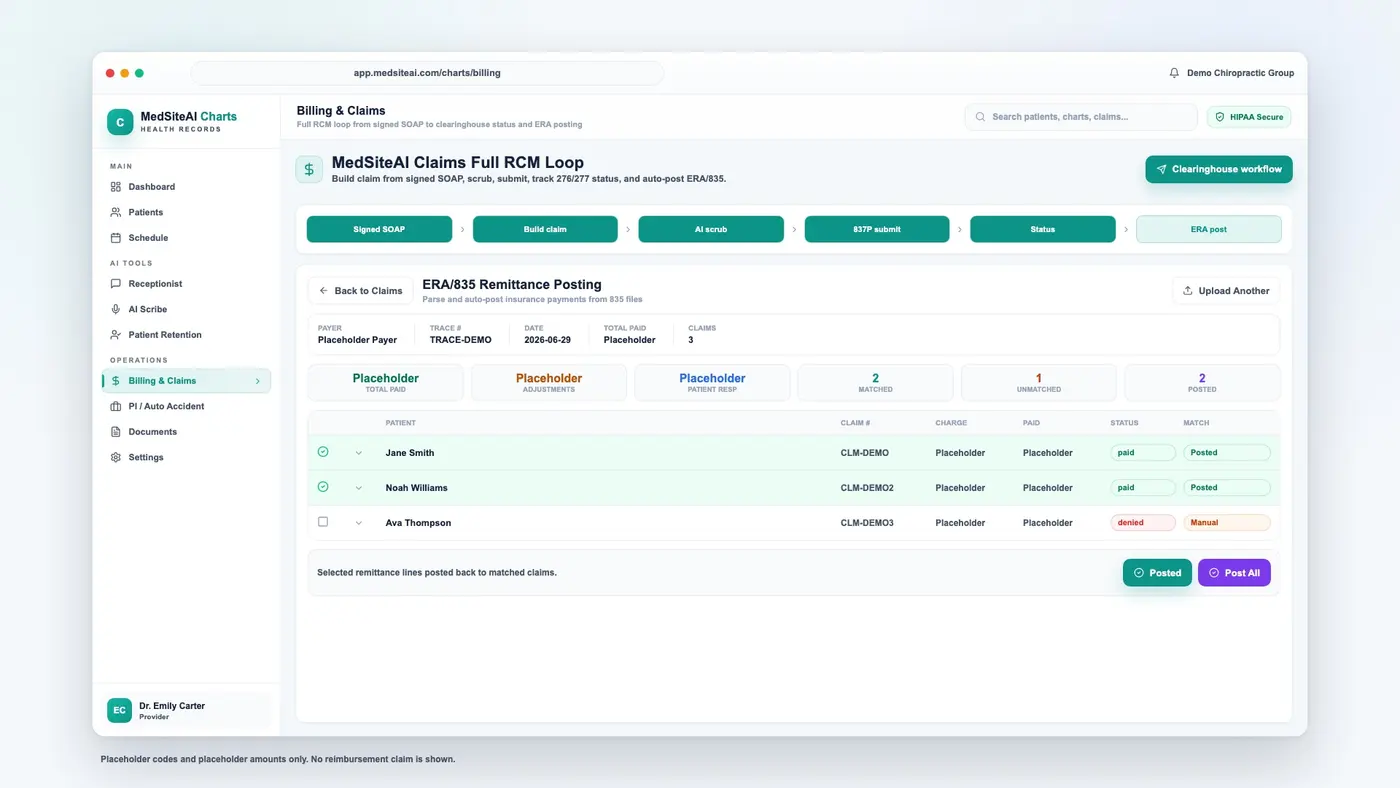
ERA + remittance posting

835 remittance information, payment status, adjustments, and follow-up stay in the same revenue workspace.

  • 835 remittance context
  • Claim payment and adjustment status
  • Patient-responsibility handoff
Used by
Billing and finance teams
Replaces
Manual ERA matching and separate payment spreadsheets
Connected to
Claims, denials, patient responsibility, and reporting
24

Payments, card on file + Text-to-Pay

Collect at booking or check-in, save a card, send a payment request, and keep the balance connected to the record.

  • Card on file and copays
  • Text-to-Pay requests
  • Receipts and payment plans
Used by
Front desk, billing, and patients
Replaces
Standalone payment links and untracked balance follow-up
Connected to
Booking, kiosk, ledger, claim response, and portal
25

Provider compensation

Per-clinician compensation plans combine base and production tiers with attribution and payroll-ready export.

  • Base and production-tier plans
  • Provider attribution
  • Payroll export
Used by
Owners, finance, and operations leaders
Replaces
Provider-production spreadsheets
Connected to
Charges, collections, provider attribution, and reporting
26

PI, lien + attorney workflows

Personal-injury cases, liens, settlement status, case optimization, and attorney-facing records sit next to the clinical chart.

  • PI and auto-accident case workspace
  • Lien and settlement tracking
  • Case optimizer and attorney portal
Used by
PI-focused clinics, billers, case managers, and attorneys
Replaces
Separate PI case trackers and manual attorney packet assembly
Connected to
Chart, imaging, narratives, claims, documents, and reports

The claim remains connected after it leaves the practice.

Product motion is supplied from the real Charts demonstration library and loads only when this proof enters the viewport.

Electronic clearinghouse workflow inside Charts

Patients + growth

Patients, leads, and staff move through connected communication rather than a stack of unrelated inboxes.

8 connected modules
27

Patient portal + engagement

Patients can access records, complete intake, message securely, manage payments, and stay connected to care.

  • Records and appointment access
  • Secure messaging and intake
  • Self-pay and follow-up
Used by
Patients, front desk, providers, and care coordinators
Replaces
A separate portal, forms system, messaging inbox, and payment page
Connected to
Chart, schedule, intake, balances, RTM, HEP, and surveys
28

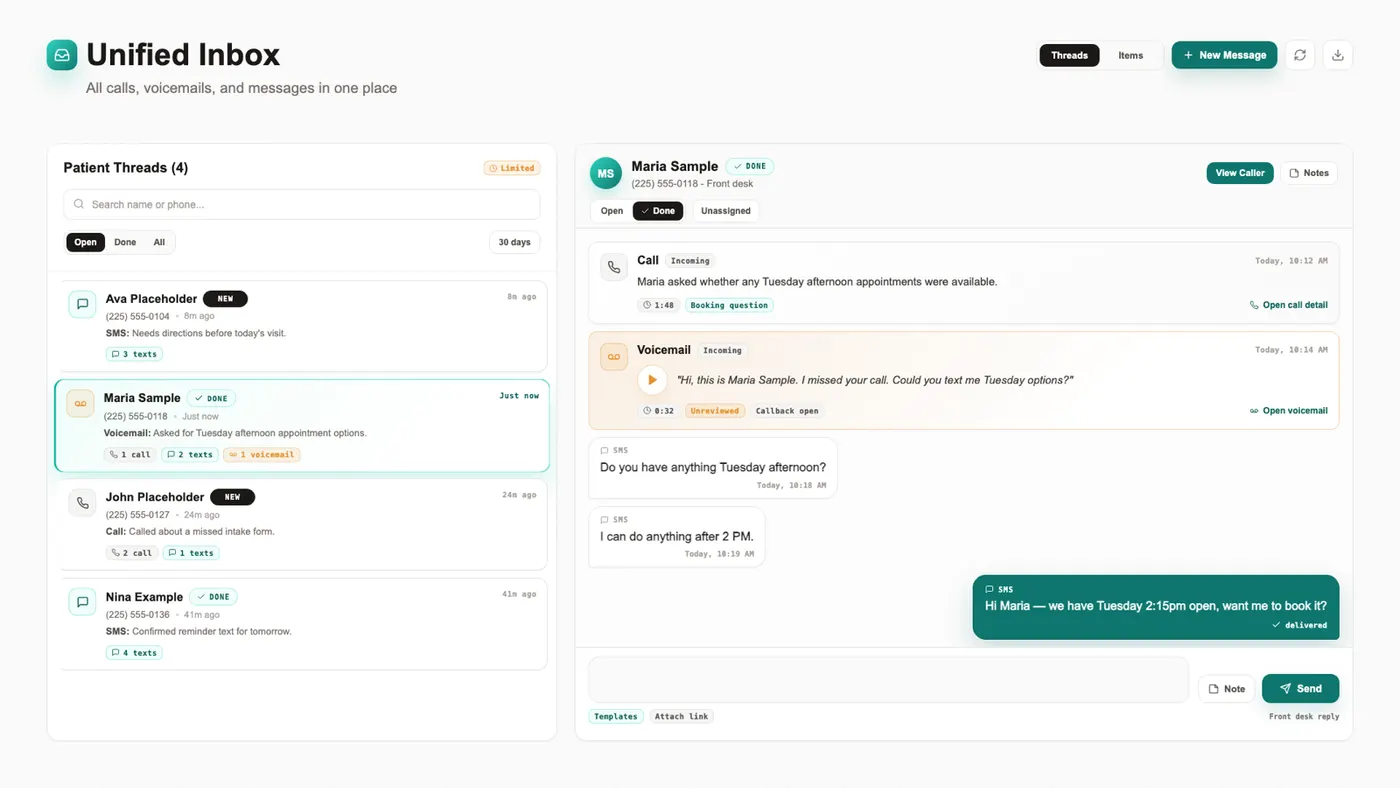
Patient messaging

Secure patient conversations, reminders, follow-up, and operational outreach stay linked to the patient record.

  • Secure record-linked threads
  • Scheduling and balance outreach
  • Care and retention follow-up
Used by
Front desk, billing, and care teams
Replaces
Unlinked personal texting and shared inboxes
Connected to
Schedule, portal, waitlist, retention, and balances
29

Engage + remote therapeutic monitoring

A branded patient app supports remote plan engagement and RTM workflows, including CPT 98980 and 98981 context.

  • Branded patient app
  • Remote engagement tracking
  • RTM billing context
Used by
Rehab and musculoskeletal care teams
Replaces
Standalone patient apps and RTM trackers
Connected to
Care plan, HEP, patient app, engagement, and billing
30

HEP video library + adherence

Providers assign exercise videos from the plan builder while patient completion and adherence return to the care record.

  • Video exercise library
  • Plan-builder assignment
  • Patient completion tracking
Used by
PT, rehab, chiropractic, and integrative teams
Replaces
Separate HEP subscriptions and paper handouts
Connected to
Treatment plan, patient app, outcomes, RTM, and reporting
31

Surveys + reviews

Post-visit survey cadence, NPS-style feedback, and review activity give teams one view of patient sentiment.

  • Post-visit survey cadence
  • Feedback and sentiment dashboard
  • Review aggregation
Used by
Owners, marketing, and patient-experience teams
Replaces
Separate survey and review dashboards
Connected to
Visit completion, messaging, CRM, and reporting
32

CRM + lead pipeline

Prospects move from inquiry through booked and converted, with referral source and follow-up activity kept visible.

  • Prospect-to-booked pipeline
  • Follow-up sequences
  • Referral-source and conversion context
Used by
Owners, front desk, marketing, and call teams
Replaces
Lead spreadsheets and generic sales CRMs
Connected to
Website, voice agent, booking, messaging, and reporting
33

Retention intelligence

Charts identifies patients in critical care windows, missed cadence, and engagement risk so teams can act.

  • At-risk patient attention
  • Plan-cadence signals
  • Re-engagement workflow
Used by
Owners, care coordinators, and schedulers
Replaces
Dropout spreadsheets and manual chart reviews
Connected to
Plan of care, schedule, messaging, outcomes, and reports
34

Team chat + in-product support

Clinical, billing, and front-desk teams can coordinate in internal channels and reach help without leaving Charts.

  • Staff-to-staff channels
  • Cross-team handoffs
  • Embedded help and ticketing
Used by
Every staff role
Replaces
Personal messaging apps and detached support portals
Connected to
Operational handoffs, task context, and support

Patient and staff conversations stay in the operating system.

Product motion is supplied from the real Charts demonstration library and loads only when this proof enters the viewport.

Unified team communication workflow

Practice platform

Reporting, website, migration, and multi-provider controls turn the clinical system into a complete operating layer.

4 connected modules
35

Fully customizable reporting

Teams build, save, and reuse clinical, operational, financial, retention, referral, and provider views.

  • Custom report builder
  • Saved reports and reusable templates
  • Clinical, operational, and financial dimensions
Used by
Owners, administrators, clinical directors, and billing leaders
Replaces
CSV assembly, static vendor reports, and spreadsheet dashboards
Connected to
Every Charts module, including CRM and compensation
36

Practice website

A MedSite practice website can share the same booking and intake path as Charts, while practices may also keep any existing site.

  • Connected booking and intake
  • Lead handoff into the platform
  • Optional—an existing website still works
Used by
Practices consolidating website, booking, and EHR
Replaces
Disconnected website forms and manually copied inquiries
Connected to
Booking, intake, patient record, voice agent, and CRM
37

Migration + data export

Implementation maps the records and workflows that matter, supports parallel preparation, and keeps practice data exportable.

  • Workflow and data mapping
  • Parallel preparation before cutover
  • Exportable practice data with no offboarding fee
Used by
Practices switching from a legacy EHR
Replaces
Risky one-day cutovers and trapped records
Connected to
Patients, schedules, forms, documents, and staff workflows
38

Multidisciplinary, multi-provider operations

Chiropractic, PT and rehab, acupuncture, integrative care, and mixed-discipline teams share one system with role-aware handoffs.

  • Multiple disciplines and providers
  • Role-aware operational handoffs
  • Shared clinical and revenue record
Used by
Solo practices through multi-provider clinics
Replaces
One EHR per discipline and disconnected staff tools
Connected to
Shared schedule, charts, claims, portal, reporting, and compensation

Questions about the complete Charts platform

Direct answers about fit, migration, ownership, AI review, and the connected platform.

01Is MedSite Charts built for multidisciplinary practices?

Yes. Charts is positioned for chiropractic, physical therapy and rehab, acupuncture, integrative care, and mixed-discipline clinics that want providers, scheduling, documentation, claims, engagement, and reporting in one system.

02Can the AI voice agent and online booking work with my current website?

Yes. A practice can keep its existing website and still connect the MedSite AI voice receptionist and online booking to the Charts schedule. A connected MedSite practice website is available when the practice wants the full website-to-EHR loop, but it is not forced.

03Does the AI scribe finalize notes or codes on its own?

No. The scribe creates an AI-assisted draft and coding suggestions. The treating provider reviews, edits, and signs the record before it is finalized.

04What is included in each MedSite Charts tier?

Charts Lite is $199 per month for a single-provider charting and scheduling foundation. Charts Core is $349 per month and adds the claims, superbill, eligibility-to-claim, and remittance workflow. Charts Plus is $499 per month for group-practice and multi-provider operations with migration support.

05How does migration from another EHR work?

The implementation team maps the data and workflows that matter, prepares the Charts environment, and can run preparation in parallel with the current EHR so the practice can keep seeing patients while records, schedules, forms, and staff handoffs are readied for cutover.

06Does the practice still own its data?

Yes. Practice data remains owned by the practice and is designed to remain exportable. MedSite Charts does not charge an offboarding fee.

Bring the workflow you cannot afford to drop.

We’ll map it against the full Charts module set, your discipline mix, and your current systems.

Book a demo Contact the team